
Key Takeaways
- Marketing automation workflows can save businesses up to 20 hours per week on repetitive tasks while increasing lead conversion rates by 77%.
- Building your first workflow requires no coding skills—just a clear goal, mapped customer journey, and the right trigger events.
- Welcome email sequences are the perfect first automation project with a 4x higher open rate than standard marketing emails.
- Bitly’s link management platform integrates seamlessly with most marketing automation tools to provide valuable tracking insights.
- Testing your workflow before launch can prevent common mistakes like timing errors and audience segmentation issues.
Imagine reaching the right customer with the perfect message at exactly the right moment—without having to manually press “send” each time. That’s the power of marketing automation workflows.
Whether you’re drowning in repetitive marketing tasks or struggling to scale your customer communications, automation provides the solution most small business owners need but assume requires technical expertise. The truth? You don’t need to be a tech wizard to build effective marketing automation. With the right guidance and tools, anyone can create workflows that convert more leads, save countless hours, and deliver measurable results.
Bitly’s link management platform has helped thousands of businesses track and optimize their marketing automation campaigns by providing reliable link tracking and analytics. This visibility into which messages resonate with audiences has proven critical for refining automation workflows for maximum impact.
Article-at-a-Glance
This comprehensive guide walks you through creating your first marketing automation workflow without requiring any technical knowledge. We’ll cover everything from choosing the right platform to building a basic welcome sequence, testing your workflow before launch, and measuring your success with simple analytics. By the end, you’ll have the confidence to implement automation that grows your business while you focus on what matters most.
“Marketing automation generates a 451% increase in qualified leads when implemented effectively.” – Forrester Research
Marketing automation isn’t just a nice-to-have tool anymore—it’s become essential for businesses of all sizes. As customer expectations for personalized, timely communication continue to rise, manually managing these interactions becomes increasingly impossible. The good news? You can start small with a single workflow and still see impressive results.
Marketing Automation Can Transform Your Business (Without Technical Headaches)
The most common misconception about marketing automation is that it requires a computer science degree to implement. This simply isn’t true. Modern platforms have evolved to be remarkably user-friendly, using visual builders and templates that make creating workflows as simple as connecting dots on a map. These drag-and-drop interfaces mean you can focus on strategy rather than syntax.
What Marketing Automation Workflows Actually Do For You
At their core, marketing automation workflows are simply a series of pre-determined actions that occur when specific conditions are met. Think of them as digital assistants who follow instructions like: “When someone downloads our ebook, wait two days, then send them an email about our related webinar.” These workflows operate behind the scenes, nurturing leads and engaging customers without constant oversight. For more insights on how automation is transforming industries, check out how it’s transforming healthcare workflows.
Time-Saving Benefits That Boost Your Bottom Line
The most immediate impact of implementing marketing automation is reclaiming your time. Tasks that previously consumed hours of manual effort—sending follow-up emails, segmenting contacts, updating CRM records—happen automatically. One survey found that marketing teams save an average of 20 hours per week after implementing basic automation workflows. This time saving translates directly to reduced operational costs and allows team members to focus on high-value creative and strategic work that machines can’t do. For more insights, explore how automation is transforming healthcare workflows with Catalyst Pro.
Beyond efficiency, automation delivers consistency that human execution simply cannot match. Every lead receives the right message at the right time, without fail. This reliability eliminates the common problem of leads falling through cracks in your sales process, which can dramatically improve conversion rates—some businesses report increases of 50% or more after implementing their first workflows.
Perhaps most importantly, automation allows for scaling your marketing efforts without proportionally scaling your team. As your contact list grows from hundreds to thousands or even millions, the same workflows continue to run effortlessly, delivering personalized experiences that would be impossible to maintain manually.
Types of Marketing Tasks Perfect for Automation
While you can automate countless marketing activities, certain tasks deliver exceptional ROI for beginners. Lead nurturing sequences that gradually build relationships through a series of targeted communications often show the quickest returns. Re-engagement campaigns that automatically reactivate dormant contacts can resurrect previously lost opportunities. And onboarding sequences ensure new customers have smooth, consistent experiences that build loyalty from day one.
3. Set Up Your Trigger Event
The trigger is what starts your entire workflow, so choosing the right one is crucial. Think of it as the domino that sets everything else in motion. Common triggers include a form submission, email subscription, product purchase, or website page visit. For your first workflow, choose a high-volume trigger that occurs frequently enough to provide meaningful data—like a newsletter signup or lead magnet download. In your automation platform, this is typically as simple as selecting “Form Submission” or “List Membership” from a dropdown menu and specifying which form or list you want to monitor.
4. Create Simple Decision Points
Decision points (sometimes called “if/then branches”) are what make your workflows truly powerful. They allow your workflow to take different paths based on subscriber behavior. For example, if someone opens your first email but doesn’t click the link inside, you might send them a follow-up with different messaging. If they did click, you might move them to a more sales-focused sequence.
For beginners, limit yourself to one or two decision points in your first workflow. Too many branches create complexity that can be difficult to troubleshoot. In most platforms, adding a decision point is as simple as dragging in a condition element and defining simple rules like “has opened email” or “has visited pricing page.”
5. Design Your Automated Messages
When crafting the emails or messages that your workflow will deliver, focus on clarity and purpose. Each message should have a single, obvious goal—whether that’s driving a click to your website, encouraging a product trial, or simply building rapport. Write your content directly in your automation platform’s editor, which typically offers templates and design tools suited for non-designers.
Remember that automated doesn’t mean impersonal. Use personalization tokens to insert your contact’s name, company, or other relevant details stored in your database. Studies show personalized emails generate up to 6x higher transaction rates, so this step is well worth the minimal extra effort it requires.
Pay particular attention to subject lines, as they determine whether your emails get opened at all. Test different approaches—questions, statistics, curiosity gaps—to see what resonates best with your audience. Most automation platforms allow for easy A/B testing of subject lines, which provides valuable data for future campaigns.
Pro Tip: Keep the 3-2-1 Rule in mind when creating workflow emails:
3 – No more than 3 short paragraphs per email
2 – Maximum of 2 different fonts
1 – Just 1 clear call-to-action
The Welcome Email Sequence: Your Perfect First Workflow

Welcome sequences consistently demonstrate the highest engagement rates of any automation type, making them ideal for first-time builders. These simple yet effective workflows trigger immediately after someone joins your email list, delivering timely, relevant content when interest levels are at their peak. The beauty of welcome sequences is their versatility—they work for virtually any business model while requiring minimal setup.
The goal of a welcome sequence isn’t necessarily immediate conversion, but rather establishing a relationship. Think of it as a digital handshake that sets expectations, delivers value, and subtly introduces your products or services. Well-crafted welcome sequences can reduce unsubscribe rates by up to 25% while increasing future email engagement by nearly 40%.
|
Welcome Sequence Element |
Purpose |
Timing |
|---|---|---|
|
Initial Confirmation |
Confirm subscription, set expectations |
Immediate |
|
Value Delivery |
Provide promised content/download |
Same day |
|
Education Email |
Share helpful tips or resources |
Day 2-3 |
|
Social Proof |
Share testimonials or case studies |
Day 4-5 |
|
Soft Promotion |
Introduce relevant product/service |
Day 6-7 |
Ideally, your welcome sequence should contain 3-5 emails spaced over approximately one week. This provides enough touchpoints to build familiarity without overwhelming new subscribers. Each email should be relatively short—around 200-300 words—and focused on a single topic or action. Remember that you can always expand this sequence later as you grow more comfortable with automation.
What Makes Welcome Sequences So Effective
Welcome emails boast open rates averaging 50-60%—dramatically higher than standard marketing emails which typically hover around 15-25%. This engagement advantage stems from timing and relevance. When someone joins your list, they’re actively interested in your brand at that precise moment. Your welcome email arrives when their interest peaks, creating a perfect opportunity to make a strong impression.
Additionally, welcome sequences establish critical patterns for future engagement. They train subscribers to expect value from your emails, increasing the likelihood they’ll open subsequent messages. These initial interactions also provide valuable behavioral data, showing which topics, subject lines, and sending times generate the best response from your audience—insights that prove invaluable for future campaign development.
Essential Elements to Include
Every effective welcome sequence should include: a warm, personality-filled introduction that humanizes your brand; clear explanation of what subscribers can expect in terms of content and frequency; delivery of any promised lead magnet or download; subtle education about your products/services woven naturally into valuable content; social proof elements like testimonials or case studies that build credibility; and finally, a low-pressure invitation to take the next step, whether that’s scheduling a call, starting a trial, or making an initial purchase. Throughout the sequence, use Bitly’s link management capabilities to track which content generates the most engagement so you can refine your approach.
Sample Timeline: When to Send Each Message
Timing is crucial for welcome sequence success. Send your initial welcome immediately after signup—delays even of a few hours significantly reduce open rates. Follow with your educational content 1-2 days later, allowing subscribers to digest your initial message. Continue with social proof elements on day 3-4, and introduce your soft offer around day 5-7 when you’ve established sufficient value and trust. Throughout this sequence, pay attention to engagement metrics like open and click rates—if they drop significantly, you may need to adjust your sending cadence to prevent subscriber fatigue. For more insights, check out how enhancing e-commerce experiences can improve your marketing strategy.
Testing Your Workflow Before Launch
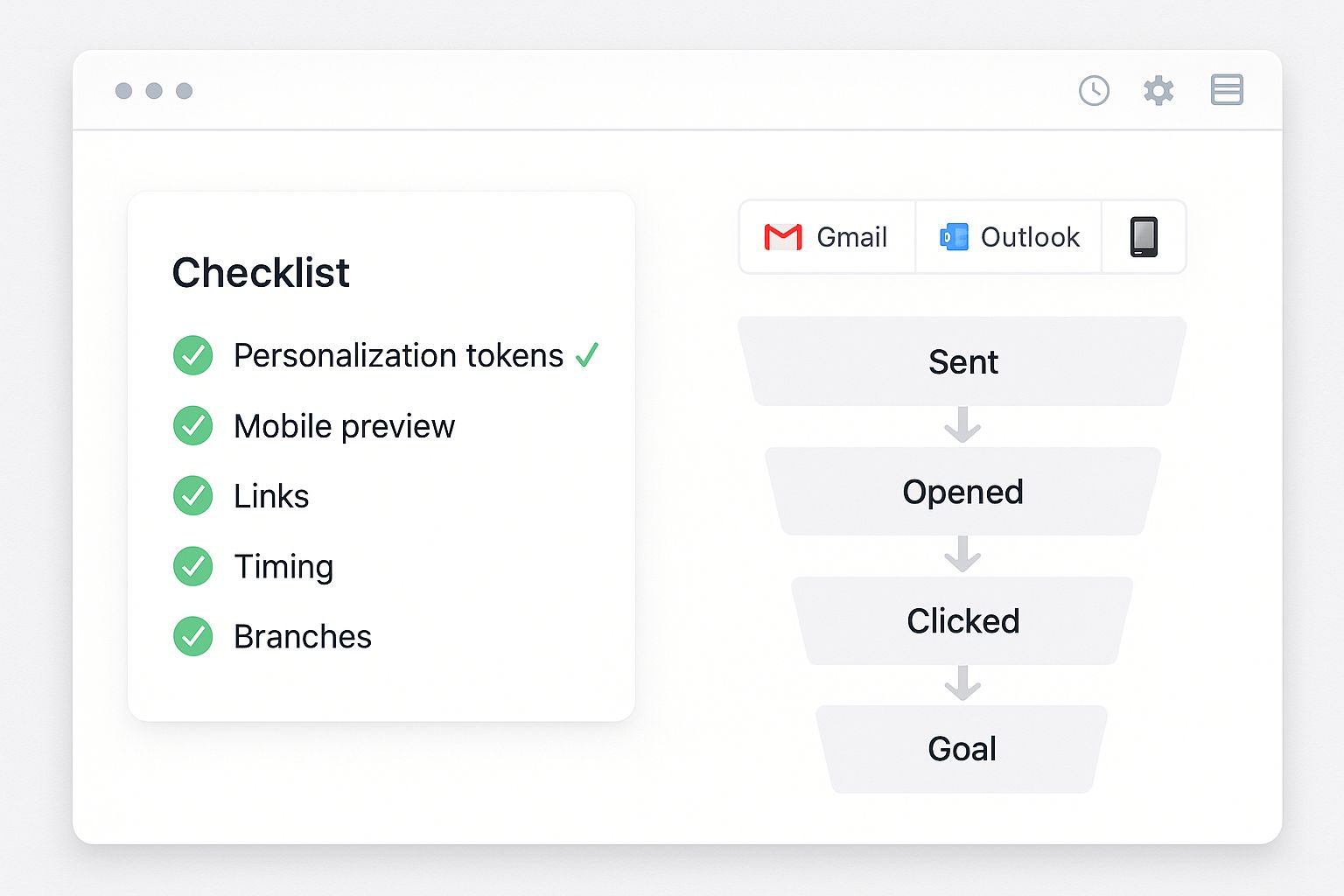
No matter how carefully you build your automation, testing is non-negotiable. Even minor mistakes like broken links or timing errors can undermine your entire campaign. Fortunately, most automation platforms offer robust testing tools that let you simulate your workflow without sending actual messages to customers. Spend time walking through every possible path your contacts might take, checking each message, link, and decision point along the way. This investment in testing can prevent embarrassing errors that damage your brand’s credibility.
The Internal Test Method That Catches 99% of Problems
Create a small internal test list using your team’s email addresses and run your complete workflow against this group before launching to actual customers. This approach reveals issues that isolated message testing might miss, particularly around timing and trigger conditions. Send yourself through every possible branch of your workflow, clicking different links and taking various actions to ensure each path works correctly.
- Create a dedicated test list with at least 3-5 different email addresses
- Document expected behavior for each path in your workflow
- Check all emails on both desktop and mobile devices
- Verify that all links lead to correct destinations
- Confirm that decision branches route contacts appropriately
Pay particular attention to time-based elements in your workflow. If you’ve set delays between messages, you’ll need to temporarily adjust these during testing. For instance, change a “wait 3 days” delay to “wait 3 minutes” so you can efficiently verify the complete sequence works properly. Just remember to reset these timing elements to their intended values before launching to your actual audience.
When testing, be methodical about checking each personalization token. These dynamic content elements can sometimes malfunction if your database contains incomplete information. Send test messages to contacts with varying profile completeness to ensure your personalization gracefully handles both complete and partial data.
Finally, run through your workflow using multiple devices and email clients. The way your messages display can vary significantly between Gmail, Outlook, mobile apps, and other environments. A quick check across platforms can identify formatting issues before they impact your audience’s experience.
Common First-Timer Mistakes to Avoid
The most frequent workflow errors stem from overly ambitious designs. Beginning automators often create complex multi-branch scenarios that become difficult to manage and troubleshoot. Start with linear workflows containing at most 2-3 decision points, then expand as you gain confidence. Similarly, watch for timing missteps—sending too many messages too quickly overwhelms subscribers, while excessive delays between messages breaks continuity and reduces engagement. For more insights, check out how transforming healthcare workflows can provide a structured approach to automation.
Another common pitfall is failing to consider what happens after your workflow ends. Without proper planning, contacts might complete your sequence and then receive nothing for months, effectively breaking the relationship you’ve worked to build. Always have a plan for transitioning contacts to your regular communication cadence or another relevant workflow once they complete your initial sequence. For more insights on this, check out this guide to marketing automation workflow.
Measure What Matters: Simple Analytics for Beginners
The true power of automation lies in its measurability. Unlike traditional marketing, automated workflows generate precise performance data that reveals what’s working and what isn’t. Rather than getting overwhelmed by dozens of possible metrics, focus initially on three key indicators: completion rate (the percentage of contacts who finish your entire workflow without unsubscribing), conversion rate (the percentage who take your desired action), and engagement trend (whether open and click rates increase or decrease throughout your sequence). These core metrics provide clear signals about your workflow’s effectiveness without requiring advanced analytical skills.
3 Numbers That Tell You If Your Workflow Is Working
The most revealing metric for workflow success is the completion-to-conversion ratio—the percentage of people who take your desired action after experiencing your complete sequence. A healthy ratio depends on your industry and offer type, but generally, if fewer than 2-3% of contacts who complete your workflow convert, your messaging likely needs refinement. Track this number weekly for the first month after launch, then monthly thereafter. Tools like Catalyst Pro’s workflow solutions can provide crucial click data that helps pinpoint exactly where prospects lose interest in your sequence, giving you clear direction for improvements.
When and How to Make Adjustments
- After 100 contacts have completed the workflow (for statistical significance)
- When completion rates drop below 85% (indicating engagement problems)
- If open rates decline by more than 15% between first and final emails
- When conversion rates fall below your industry benchmark
- If A/B tests reveal clear winners that outperform current content
When making workflow adjustments, change only one element at a time. This disciplined approach allows you to identify exactly which modifications impact performance. Start with the elements showing the poorest metrics—if your third email has a dramatically lower open rate, begin by testing new subject lines. If click-through rates are suffering, experiment with different call-to-action placements or messaging.
Remember that optimization is ongoing, not a one-time task. Schedule regular review sessions—monthly for active workflows—to assess performance and identify improvement opportunities. This consistent attention ensures your automation remains effective as market conditions and customer preferences evolve.
Most importantly, document everything. Keep records of what you’ve changed, when you changed it, and the resulting impact on performance. This documentation creates an invaluable knowledge base that will inform all your future automation efforts and accelerate your learning curve.
Setting Up Basic Reports Anyone Can Understand
Creating simple performance reports doesn’t require advanced technical skills. Most automation platforms include built-in reporting dashboards that visualize key metrics automatically. Start by setting up a basic weekly report that tracks open rates, click rates, and conversion rates for each step in your workflow. Share these reports with stakeholders using screenshots or exported PDFs rather than expecting everyone to log into your platform. For deeper insights, use UTM parameters on all workflow links and connect them to Google Analytics to see how automation-driven traffic behaves on your website compared to other sources.
Scale Up: Where to Go After Your First Success
Once your initial workflow performs consistently, it’s time to expand your automation ecosystem. The key is to build incrementally, adding one new workflow at a time rather than attempting to automate everything simultaneously. Each new automation should either address a different stage in your customer journey or target a distinct segment of your audience. This methodical expansion ensures you maintain quality while gradually reducing your manual workload across the entire customer lifecycle.
From Welcome Series to Lead Nurturing
Lead nurturing workflows represent the natural next step after mastering welcome sequences. While welcome sequences introduce new contacts to your brand, nurturing workflows move qualified prospects closer to purchase through educational content and targeted offers. The most effective nurturing workflows segment leads based on behavior and interests, then deliver progressively more targeted content as prospects demonstrate engagement. For example, if someone downloads your beginner’s guide and then reads several blog posts about a specific topic, your nurturing workflow might automatically send case studies related to that interest, followed by a relevant product offer.
Customer Re-engagement Workflows
Re-engagement workflows target dormant subscribers or customers who haven’t interacted with your brand recently. These automated sequences typically begin by acknowledging the absence of interaction, then offering compelling reasons to reconnect. Effective re-engagement triggers include no email opens in 90 days, no purchases in 6 months, or abandoned shopping carts. The key metrics for these workflows differ from standard campaigns—success is often measured by “win-back rate” (the percentage of dormant contacts who become active again) rather than conversion rate. A well-designed re-engagement workflow can recover 5-15% of inactive subscribers, representing significant revenue that would otherwise be lost. To learn more about enhancing customer experiences, check out this article on enhancing e-commerce experiences.
Post-Purchase Sequences That Drive Loyalty
Post-purchase workflows transform one-time buyers into repeat customers and advocates. These sequences typically begin immediately after purchase confirmation, providing order information and setting expectations for delivery or implementation. They continue with usage tips, complementary product suggestions, and strategic requests for reviews or referrals. The timing of post-purchase sequences varies by product type—physical products might focus on the unboxing experience and initial usage, while software products might emphasize onboarding and feature adoption. The ROI on these workflows is exceptional, with studies showing that increasing customer retention by just 5% can increase profits by 25-95%.
When designing post-purchase sequences, pay special attention to segmentation based on purchase history. First-time buyers require different messaging than repeat customers, and high-value purchases warrant more touchpoints than lower-value transactions. This contextual awareness significantly increases the effectiveness of your automation while demonstrating that you understand your customers’ unique relationship with your brand.
Your Automation Roadmap: Next Steps for Growth
As your automation skills develop, create a structured roadmap for expanding your capabilities. Begin by mapping all potential automation opportunities across your customer journey, from initial awareness through advocacy. Prioritize these opportunities based on potential impact (revenue or time savings) and implementation difficulty, focusing first on high-impact, low-difficulty workflows.
Consider adopting more advanced automation techniques like predictive sending (automatically delivering emails when recipients are most likely to engage) and behavioral triggers (initiating workflows based on website browsing patterns). These sophisticated approaches typically deliver 30-50% higher engagement rates than standard time-based sequences.
Eventually, aim to integrate your marketing automation with other business systems—CRM, e-commerce platforms, customer service tools—to create a unified data ecosystem. This integration enables truly personalized experiences based on complete customer profiles rather than isolated interaction data. While this level of integration may require technical assistance, the resulting capabilities justify the investment for growing businesses.
- Audit existing manual processes to identify new automation opportunities
- Implement progressive profiling to gather additional contact data over time
- Develop segment-specific workflows for different buyer personas
- Create industry-specific content sequences for vertical marketing
- Establish automated reporting that tracks ROI across all workflows
Remember that automation is a journey, not a destination. The most successful businesses continuously refine their workflows based on performance data and evolving customer preferences. By starting simple and scaling methodically, you’ll build an automation ecosystem that delivers exceptional customer experiences while dramatically reducing your operational workload.
Frequently Asked Questions
These common questions address the most frequent concerns for businesses implementing their first marketing automation workflows. Understanding these fundamentals will help you avoid typical roadblocks and accelerate your automation journey.
How much time will my first marketing automation workflow save?
Most businesses save 5-15 hours weekly with their first automation workflow, depending on current manual processes and contact volume. A basic welcome sequence typically eliminates 2-3 hours of weekly email management for every 100 new leads, while more complex workflows like lead nurturing can save 10+ hours weekly. The time savings compound as your contact database grows—automation handling 10,000 contacts requires no more effort than managing 100. Track your time investment before and after implementation to calculate your specific ROI, focusing not just on hours saved but also on the value of newly available time for strategic initiatives.
Do I need to learn coding to create effective marketing automation?
Modern marketing automation platforms require zero coding knowledge for building effective workflows. Today’s visual workflow builders use intuitive drag-and-drop interfaces where you simply connect elements like triggers, conditions, and actions. While advanced customization might occasionally benefit from HTML/CSS knowledge (particularly for email design), this is entirely optional. If your automation goals require capabilities beyond what visual builders provide, consider template-based approaches or pre-built workflow recipes before resorting to custom code. For 95% of marketing automation use cases, the built-in visual tools are more than sufficient.
How long should I wait before making changes to my workflow?
Wait until at least 100 contacts have completed your workflow before making significant changes. This sample size provides statistically meaningful data for decision-making. For most businesses, this represents 2-4 weeks of data collection after launch. During this initial period, focus on monitoring rather than modifying, noting potential improvement areas without implementing changes. This disciplined approach prevents reactionary adjustments based on insufficient data. The exception to this rule is technical errors—if you discover broken links or incorrect information, fix these issues immediately, regardless of sample size.
Can I build marketing automation workflows with free tools?
Yes, several platforms offer free tiers that support basic workflow creation. MailerLite, HubSpot, and SendinBlue all provide free plans that include automation capabilities, though with limitations on contact numbers or workflow complexity. These free options work well for small businesses implementing their first 1-2 workflows. However, as your automation strategy matures, paid platforms typically deliver superior results through advanced segmentation, testing capabilities, and integration options. When evaluating free tools, focus not just on current needs but growth potential—migrating between platforms later can require significant effort.
What’s the biggest mistake beginners make with marketing automation?
- Creating overly complex workflows with too many decision branches
- Focusing on automation technology rather than strategy and content
- Neglecting to test workflows thoroughly before launch
- Setting workflows to “set and forget” without regular optimization
- Prioritizing quantity over quality in automated communications
The most damaging mistake is treating automation as a replacement for personalization rather than a tool to deliver personalized experiences at scale. Effective automation enhances rather than diminishes the human connection with your audience. Always prioritize relevance and value over frequency and complexity when building your workflows.
Building your first marketing automation workflow marks the beginning of a transformative journey for your business. Start small, focus on fundamentals, and expand methodically as your confidence grows. Remember that even simple automation delivers significant advantages over completely manual processes—perfect is the enemy of progress when it comes to implementation.
The businesses that benefit most from automation are those that view it as an ongoing practice rather than a one-time project. Commit to regular review and refinement of your workflows, and you’ll continuously improve results while reducing your workload. That’s the true power of marketing automation—growing your business impact while simultaneously reclaiming your time.
Ready to see how automated workflows can transform your marketing results? The tools and knowledge are accessible to businesses of any size. Your first successful workflow is just a few steps away.
Bitly’s link management platform integrates seamlessly with your marketing automation tools to provide detailed analytics and tracking for all your automated campaigns, helping you make data-driven decisions that continuously improve performance.
Building your first marketing automation workflow can seem daunting, but with the right guidance, it’s entirely achievable even without technical skills. If you’re looking for a comprehensive guide, check out this ultimate guide to marketing automation, which provides step-by-step instructions to help you get started.
Ready to build a workflow that saves 10–20 hours a week—without the tech headache?
Catalyst Pro sets up your first automation (welcome + nurture), wires in tracking (Bitly + UTMs), and hands you plug-and-play templates your team can run tomorrow.
Get your free Automation Blueprint »
Includes platform selection, trigger mapping, copy templates, and testing checklist.
Get My Automation Blueprint

